Lyna Agent
Enterprise AI Collaboration Assistant
Not just a chatbot. Lyna is an AI collaboration partner truly integrated into your enterprise workflows — managing schedules, handling email, co-authoring documents, safeguarding knowledge, and verifying every output alongside your team.
See Lyna in Action
Real screenshots from the Lyna interface — click any image to enlarge
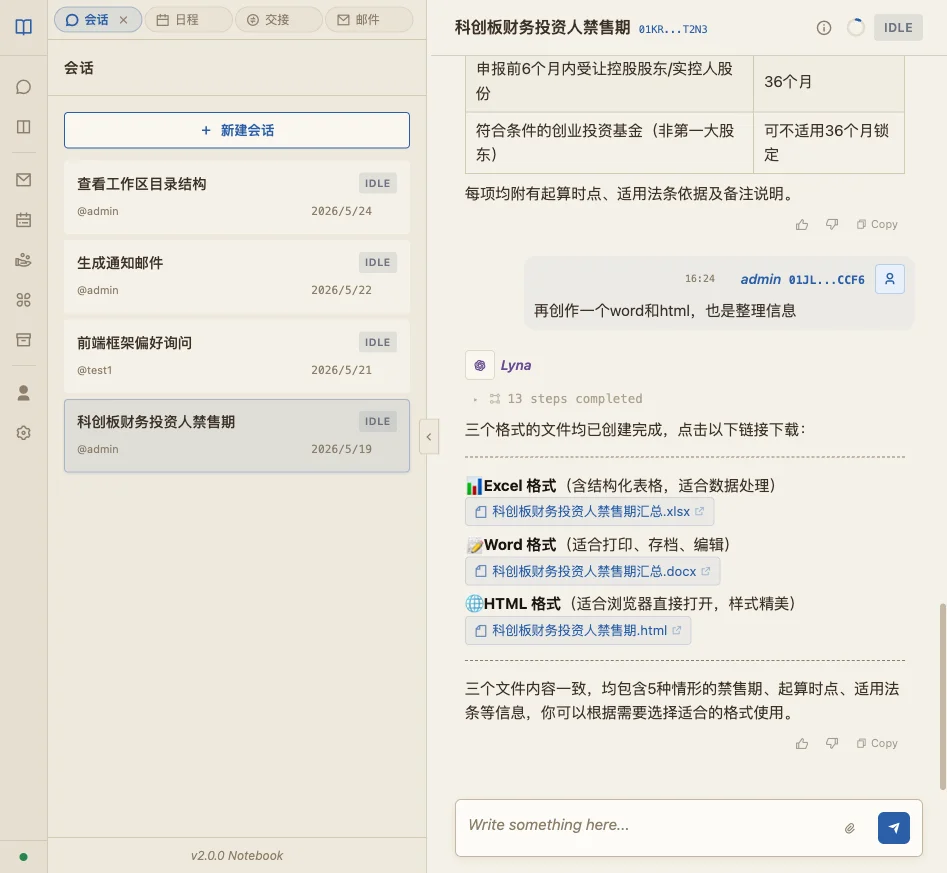
AI Conversation Interface
Clean, focused chat interface. Talk to Lyna in natural language — schedule meetings, draft emails, summarize documents, or kick off complex multi-step workflows. Everything starts with a single message.
Core Collaboration Capabilities
Six core scenarios covering daily enterprise work — letting Agents participate rather than observe
Smart Schedule Management
Schedule, modify, and query events in natural language. The Agent understands meeting conflicts, priorities, and timezone differences — proactively reminding you and suggesting optimal timing so calendar management requires zero effort.
Personal Email Intelligence
Connect your personal mailbox and the Agent automatically classifies, summarizes, and drafts replies. Important emails are flagged first. Supports custom handling rules and reply style templates.
Corporate Shared Inbox
Connect company-wide mailboxes (customer service, BD, recruiting, etc.) for multi-person collaboration. The Agent auto-assigns owners, tracks progress, and archives history with unified reply standards.
Agent → Human Handoff
After completing a phase of work, the Agent proactively initiates a handoff request to designated team members with a work summary, items to confirm, and next-step suggestions. One-click accept or reject — closing the human-AI collaboration loop.
Skills: Write & One-Click Optimize
Describe your business scenario in plain language — Lyna auto-generates the corresponding Skill (prompt + tool-call logic). Built-in one-click "Professional Optimize" has an advanced model rewrite the Skill with role definition, boundary reinforcement, and error handling — reaching professional prompt-engineer quality.
Skills Preview — Reduce AI Friction
Every Skill has a sandbox preview mode: test-run any input before going live, watching the Agent's reasoning path and output draft in real time. Dramatically reduces the gap between "what you expected AI to do" and "what AI actually does."
Workspace Collaboration System
Private and shared coexist — Human and Agent co-manage with clear, controllable information boundaries
Secure Private Workspace
Session ownership model + sessionGuard middleware provide dual protection. Conversations, files, and knowledge base content in a personal Workspace are completely invisible to other members (including admins). The Agent strictly respects access boundaries, eliminating information leakage.
Enterprise Shared Workspace
Team members and Agents can collaboratively read and write in shared Workspaces. Fine-grained permission configuration (read/write/manage) and real-time sync to all members — ideal for project collaboration, knowledge retention, and cross-department coordination.
Human + Agent Co-Management
Workspaces are maintained cooperatively: humans handle directional decisions and final approval; Agents handle information organization, auto-archiving, and periodic cleanup of redundant content. Every Agent write operation has a traceable log with one-click undo.
Agent
Engine
Trusted Output: Work Review Subagent
Hallucination rejection is not luck — it is a systematic atomic verification mechanism
Work Review Subagent
Key DifferentiatorLyna's Review Subagent is a verification layer completely independent of the main Agent. Whenever the main Agent completes an output — whether generating a report, modifying a file, or giving a recommendation — the Review Subagent atomically decomposes it:
Key mechanism: When review fails, the system rejects the output and requires the main Agent to correct and resubmit — looping until it passes. Users always see verified results, never first-draft output.
Hallucination-Free Knowledge System
Built-in RAGless knowledge engine — no chunking, no semantic breaks, no hallucinations
Built-in Archive Manager RAGless KB
No vector database, no document chunking. A hierarchical tree index mimics how human experts read documents — eliminating the semantic breaks and hallucinations that traditional RAG causes by slicing context.
Enterprise Knowledge Base
Tenant-exclusive knowledge space maintained by admins. Create multiple topic KBs (product manuals, regulations, internal standards, etc.). Agents automatically retrieve the most relevant KB when executing tasks, ensuring evidence-backed answers.
Personal Knowledge Base
Each member has a private knowledge space for personal work materials, industry literature, and research reports. Agents prioritize personal KBs in private Workspaces — delivering a truly personalized AI collaboration experience.
Deep Enterprise Document Control
Precisely manipulate Word / Excel — not just generate plain text. From legal instruments to audit reports, original formatting fully preserved.
Precise Enterprise Document Creation & Editing
Precisely manipulate Word and Excel files — not just generate unformatted plain text. The Agent understands document structure (sections, clauses, tables, headers/footers) and can insert, modify, or delete content in the correct location while fully preserving original formatting and styles.
- Legal contracts and legal instruments
- Listed company announcements (periodic/interim)
- Audit reports and financial analysis
- Tender documents and commercial bids
- Board resolutions and shareholder agreements
Local Version: One-Command Agent File Management
The local deployment version allows Agents to directly manage the local filesystem: bulk rename, categorize, content search, and cross-file summarization. One instruction completes what would otherwise take hours of manual file organization.
- Bulk file categorization & renaming
- Cross-folder content search
- Multi-document comparison & merge
- Scheduled auto-backup and archiving
File Version Control & Rollback
Every Agent file modification automatically creates a version snapshot. View the complete change history, diff any two versions, and roll back to any historical state with one click. Completely eliminates the risk of "Agent made a mistake and I can't recover the original."
- Automatic version snapshots
- Traceable modification history
- One-click precise rollback
- Mis-operation circuit breaker
Enterprise-Grade Security System
Multi-layer protection — AI capabilities unleashed within controlled boundaries, not running bare in production
Work Review Subagent
For critical task outputs, Lyna has a built-in independent Review Subagent. It atomically verifies each element of the main Agent's work: checks that factual claims are sourced, citations exist, numbers are consistent, and logic holds. If a hallucination or error is detected, the output is rejected and the main Agent is required to correct and resubmit — never silently passed through.
Safeguard Mechanism
Multi-layer security: input filtering (intercepts unauthorized commands), output inspection (sensitive data redaction), and operation whitelisting (Agents can only perform pre-authorized actions). Any request outside the permission scope is logged, rejected, and triggers an alert notification.
Sandbox Execution Isolation
Agent code execution, file operations, and external API calls all run inside an isolated sandbox container, completely separate from the main system. Sandboxes have resource quotas and auto-terminate on timeout, preventing runaway Agent tasks from consuming system resources.
File & Information Isolation
Zero data sharing between tenants with database row-level isolation. File storage is independently partitioned per tenant — Agents cannot read files or context across tenants. Enterprise private knowledge bases are strictly separated from public ones, enforcing least-privilege even in shared Workspaces.
Skills Ecosystem
Anyone can create professional-grade AI skills — no prompt engineer required
Natural Language Creation + One-Click Professional Optimize
Describe your business scenario in one sentence — Lyna auto-generates the initial Skill. Click "Professional Optimize" and an advanced model performs a deep rewrite: adds role definition, reinforces task boundaries, adds error handling, and optimizes output format — reaching professional prompt-engineer delivery quality.
Skills Preview — Zero-Risk Validation
Before deploying a Skill, Preview mode lets you fully observe Agent behavior: input any sample data and watch the reasoning path, tool-call sequence, and output draft in real time. Spot deviations and adjust immediately — no trial-and-error in production.
Let AI Truly Join Your Work
Not a chat box — a collaboration partner. Lyna works alongside your team to handle email, manage documents, and retain knowledge. Every output is verified, every action within safe boundaries.